
465 lines
25 KiB
Markdown
465 lines
25 KiB
Markdown
<h4 align="right"><a href="https://github.com/tw93/Pake">English</a> | <a href="https://github.com/tw93/Pake/blob/master/README_CN.md">简体中文</a> | <strong>日本語</strong></h4>
|
||
<p align="center">
|
||
<img src=https://gw.alipayobjects.com/zos/k/fa/logo-modified.png width=138/>
|
||
</p>
|
||
<h1 align="center">Pake</h1>
|
||
<p align="center"><strong>Rustを使って、簡単にウェブページをデスクトップアプリに変換します。</strong></p>
|
||
<div align="center">
|
||
<a href="https://twitter.com/HiTw93" target="_blank">
|
||
<img alt="twitter" src="https://img.shields.io/badge/follow-Tw93-red?style=flat-square&logo=Twitter"></a>
|
||
<a href="https://t.me/+GclQS9ZnxyI2ODQ1" target="_blank">
|
||
<img alt="telegram" src="https://img.shields.io/badge/chat-telegram-blueviolet?style=flat-square&logo=Telegram"></a>
|
||
<a href="https://github.com/tw93/Pake/releases" target="_blank">
|
||
<img alt="GitHub downloads" src="https://img.shields.io/github/downloads/tw93/Pake/total.svg?style=flat-square"></a>
|
||
<a href="https://github.com/tw93/Pake/commits" target="_blank">
|
||
<img alt="GitHub commit" src="https://img.shields.io/github/commit-activity/m/tw93/Pake?style=flat-square"></a>
|
||
<a href="https://github.com/tw93/Pake/issues?q=is%3Aissue+is%3Aclosed" target="_blank">
|
||
<img alt="GitHub closed issues" src="https://img.shields.io/github/issues-closed/tw93/Pake.svg?style=flat-square"></a>
|
||
<a href="https://colab.research.google.com/drive/1bX345znvDZ30848xjRtpgtU8eypWwXrp?usp=sharing" target="_blank">
|
||
<img alt="Open in Colab" src="https://colab.research.google.com/assets/colab-badge.svg"></a>
|
||
</div>
|
||
|
||
<div align="left">PakeはMac、Windows、Linuxをサポートしています。<a href="#人気のパッケージ">人気のパッケージ</a>、<a href="#コマンドラインパッケージング">コマンドラインパッケージング</a>、<a href="#開発">カスタマイズ開発</a>に関する情報はREADMEをご覧ください。<a href=https://github.com/tw93/Pake/discussions>ディスカッション</a>でご意見をお聞かせください。</div>
|
||
|
||
## 特徴
|
||
|
||
- 🎐 Electron パッケージと比較して約 20 倍小さい(約 5M!)
|
||
- 🚀 Rust Tauri を使用しているため、Pake は JS ベースのフレームワークよりもはるかに軽量で高速です。
|
||
- 📦 パッケージにはショートカットの透過、没入型ウィンドウ、ミニマリストのカスタマイズが含まれています。
|
||
- 👻 Pake は単なるシンプルなツールです—Tauri を使用して古いバンドルアプローチを置き換えます(PWA も十分に良いです)。
|
||
|
||
## 人気のパッケージ
|
||
|
||
<table>
|
||
<tr>
|
||
<td>WeRead
|
||
<a href="https://github.com/tw93/Pake/releases/latest/download/WeRead.dmg">Mac</a>
|
||
<a href="https://github.com/tw93/Pake/releases/latest/download/WeRead_x64.msi">Windows</a>
|
||
<a href="https://github.com/tw93/Pake/releases/latest/download/WeRead_x86_64.deb">Linux</a>
|
||
</td>
|
||
<td>Twitter
|
||
<a href="https://github.com/tw93/Pake/releases/latest/download/Twitter.dmg">Mac</a>
|
||
<a href="https://github.com/tw93/Pake/releases/latest/download/Twitter_x64.msi">Windows</a>
|
||
<a href="https://github.com/tw93/Pake/releases/latest/download/Twitter_x86_64.deb">Linux</a>
|
||
</td>
|
||
</tr>
|
||
<tr>
|
||
<td><img src=https://raw.githubusercontent.com/tw93/static/main/pake/WeRead.jpg width=600/></td>
|
||
<td><img src=https://raw.githubusercontent.com/tw93/static/main/pake/Twitter.jpg width=600/></td>
|
||
</tr>
|
||
<tr>
|
||
<td>ChatGPT
|
||
<a href="https://github.com/tw93/Pake/releases/latest/download/ChatGPT.dmg">Mac</a>
|
||
<a href="https://github.com/tw93/Pake/releases/latest/download/ChatGPT_x64.msi">Windows</a>
|
||
<a href="https://github.com/tw93/Pake/releases/latest/download/ChatGPT_x86_64.deb">Linux</a>
|
||
</td>
|
||
<td>Poe
|
||
<a href="https://github.com/tw93/Pake/releases/latest/download/Poe.dmg">Mac</a>
|
||
<a href="https://github.com/tw93/Pake/releases/latest/download/Poe_x64.msi">Windows</a>
|
||
<a href="https://github.com/tw93/Pake/releases/latest/download/Poe_x86_64.deb">Linux</a>
|
||
</td>
|
||
</tr>
|
||
<tr>
|
||
<td><img src=https://raw.githubusercontent.com/tw93/static/main/pake/ChatGPT.png width=600/></td>
|
||
<td><img src=https://raw.githubusercontent.com/tw93/static/main/pake/Poe.png width=600/></td>
|
||
</tr>
|
||
<tr>
|
||
<td>YouTube Music
|
||
<a href="https://github.com/tw93/Pake/releases/latest/download/YouTubeMusic.dmg">Mac</a>
|
||
<a href="https://github.com/tw93/Pake/releases/latest/download/YouTubeMusic_x64.msi">Windows</a>
|
||
<a href="https://github.com/tw93/Pake/releases/latest/download/YouTubeMusic_x86_64.deb">Linux</a>
|
||
</td>
|
||
<td>YouTube
|
||
<a href="https://github.com/tw93/Pake/releases/latest/download/YouTube.dmg">Mac</a>
|
||
<a href="https://github.com/tw93/Pake/releases/latest/download/YouTube_x64.msi">Windows</a>
|
||
<a href="https://github.com/tw93/Pake/releases/latest/download/YouTube_x86_64.deb">Linux</a>
|
||
</td>
|
||
</tr>
|
||
<tr>
|
||
<td><img src=https://raw.githubusercontent.com/tw93/static/main/pake/YouTubeMusic.png width=600 /></td>
|
||
<td><img src=https://raw.githubusercontent.com/tw93/static/main/pake/YouTube.jpg width=600 /></td>
|
||
</tr>
|
||
<tr>
|
||
<td>LiZhi
|
||
<a href="https://github.com/tw93/Pake/releases/latest/download/LiZhi.dmg">Mac</a>
|
||
<a href="https://github.com/tw93/Pake/releases/latest/download/LiZhi_x64.msi">Windows</a>
|
||
<a href="https://github.com/tw93/Pake/releases/latest/download/LiZhi_x86_64.deb">Linux</a>
|
||
</td>
|
||
<td>ProgramMusic
|
||
<a href="https://github.com/tw93/Pake/releases/latest/download/ProgramMusic.dmg">Mac</a>
|
||
<a href="https://github.com/tw93/Pake/releases/latest/download/ProgramMusic_x64.msi">Windows</a>
|
||
<a href="https://github.com/tw93/Pake/releases/latest/download/ProgramMusic_x86_64.deb">Linux</a>
|
||
</td>
|
||
</tr>
|
||
<tr>
|
||
<td><img src=https://raw.githubusercontent.com/tw93/static/main/pake/LiZhi.jpg width=600/></td>
|
||
<td><img src=https://raw.githubusercontent.com/tw93/static/main/pake/ProgramMusic.jpg width=600/></td>
|
||
</tr>
|
||
<tr>
|
||
<td>Qwerty
|
||
<a href="https://github.com/tw93/Pake/releases/latest/download/Qwerty.dmg">Mac</a>
|
||
<a href="https://github.com/tw93/Pake/releases/latest/download/Qwerty_x64.msi">Windows</a>
|
||
<a href="https://github.com/tw93/Pake/releases/latest/download/Qwerty_x86_64.deb">Linux</a>
|
||
</td>
|
||
<td>CodeRunner
|
||
<a href="https://github.com/tw93/Pake/releases/latest/download/CodeRunner.dmg">Mac</a>
|
||
<a href="https://github.com/tw93/Pake/releases/latest/download/CodeRunner_x64.msi">Windows</a>
|
||
<a href="https://github.com/tw93/Pake/releases/latest/download/CodeRunner_x86_64.deb">Linux</a>
|
||
</td>
|
||
</tr>
|
||
<tr>
|
||
<td><img src=https://raw.githubusercontent.com/tw93/static/main/pake/Qwerty.png width=600/></td>
|
||
<td><img src=https://raw.githubusercontent.com/tw93/static/main/pake/CodeRunner.jpg width=600/></td>
|
||
</tr>
|
||
<tr>
|
||
<td>Flomo
|
||
<a href="https://github.com/tw93/Pake/releases/latest/download/Flomo.dmg">Mac</a>
|
||
<a href="https://github.com/tw93/Pake/releases/latest/download/Flomo_x64.msi">Windows</a>
|
||
<a href="https://github.com/tw93/Pake/releases/latest/download/Flomo_x86_64.deb">Linux</a>
|
||
</td>
|
||
<td>XiaoHongShu
|
||
<a href="https://github.com/tw93/Pake/releases/latest/download/XiaoHongShu.dmg">Mac</a>
|
||
<a href="https://github.com/tw93/Pake/releases/latest/download/XiaoHongShu_x64.msi">Windows</a>
|
||
<a href="https://github.com/tw93/Pake/releases/latest/download/XiaoHongShu_x86_64.deb">Linux</a>
|
||
</td>
|
||
</tr>
|
||
<tr>
|
||
<td><img src=https://raw.githubusercontent.com/tw93/static/main/pake/Flomo.png width=600/></td>
|
||
<td><img src=https://raw.githubusercontent.com/tw93/static/main/pake/XiaoHongShu.png width=600/></td>
|
||
</tr>
|
||
</table>
|
||
|
||
<details>
|
||
<summary>🏂 <a href="https://github.com/tw93/Pake/releases">リリース</a>からさらに多くのアプリケーションをダウンロードできます。<b>ここをクリックしてショートカットの参照を展開してください!</b></summary>
|
||
|
||
<br/>
|
||
|
||
| Mac | Windows/Linux | 機能 |
|
||
| --------------------------- | ------------------------------ | ------------------------------ |
|
||
| <kbd>⌘</kbd> + <kbd>[</kbd> | <kbd>Ctrl</kbd> + <kbd>←</kbd> | 前のページに戻る |
|
||
| <kbd>⌘</kbd> + <kbd>]</kbd> | <kbd>Ctrl</kbd> + <kbd>→</kbd> | 次のページに進む |
|
||
| <kbd>⌘</kbd> + <kbd>↑</kbd> | <kbd>Ctrl</kbd> + <kbd>↑</kbd> | ページのトップに自動スクロール |
|
||
| <kbd>⌘</kbd> + <kbd>↓</kbd> | <kbd>Ctrl</kbd> + <kbd>↓</kbd> | ページの底に自動スクロール |
|
||
| <kbd>⌘</kbd> + <kbd>r</kbd> | <kbd>Ctrl</kbd> + <kbd>r</kbd> | ページをリフレッシュ |
|
||
| <kbd>⌘</kbd> + <kbd>w</kbd> | <kbd>Ctrl</kbd> + <kbd>w</kbd> | ウィンドウを隠す、終了しない |
|
||
| <kbd>⌘</kbd> + <kbd>-</kbd> | <kbd>Ctrl</kbd> + <kbd>-</kbd> | ページを縮小 |
|
||
| <kbd>⌘</kbd> + <kbd>+</kbd> | <kbd>Ctrl</kbd> + <kbd>+</kbd> | ページを拡大 |
|
||
| <kbd>⌘</kbd> + <kbd>=</kbd> | <kbd>Ctrl</kbd> + <kbd>=</kbd> | ページを拡大 |
|
||
| <kbd>⌘</kbd> + <kbd>0</kbd> | <kbd>Ctrl</kbd> + <kbd>0</kbd> | ページのズームをリセット |
|
||
|
||
さらに、タイトルバーをダブルクリックして全画面モードに切り替えることができます。Mac ユーザーは、ジェスチャーを使用して前のページまたは次のページに移動することもできます。ウィンドウを移動するには、タイトルバーをドラッグします。
|
||
|
||
</details>
|
||
|
||
## 始める前に
|
||
|
||
1. **初心者の方へ**: 「人気のパッケージ」を使用して Pake の機能を試してみてください。または、[GitHub Actions](<https://github.com/tw93/Pake/wiki/Online-Compilation-(used-by-ordinary-users)>)を使用してアプリケーションをパッケージ化してみてください。[ディスカッション](https://github.com/tw93/Pake/discussions)で助けを求めることもできます!
|
||
2. **開発者の方へ**: 「コマンドラインパッケージング」を使用してください。macOS では完全にサポートされています。Windows/Linux ユーザーは、[環境を設定](https://tauri.app/v1/guides/getting-started/prerequisites)する必要があります。
|
||
3. **ハッカーの方へ**: フロントエンド開発と Rust の両方が得意な方は、以下の[カスタマイズ開発](#開発)でアプリの機能をさらにカスタマイズしてみてください。
|
||
|
||
## コマンドラインパッケージング
|
||
|
||
|
||
|
||
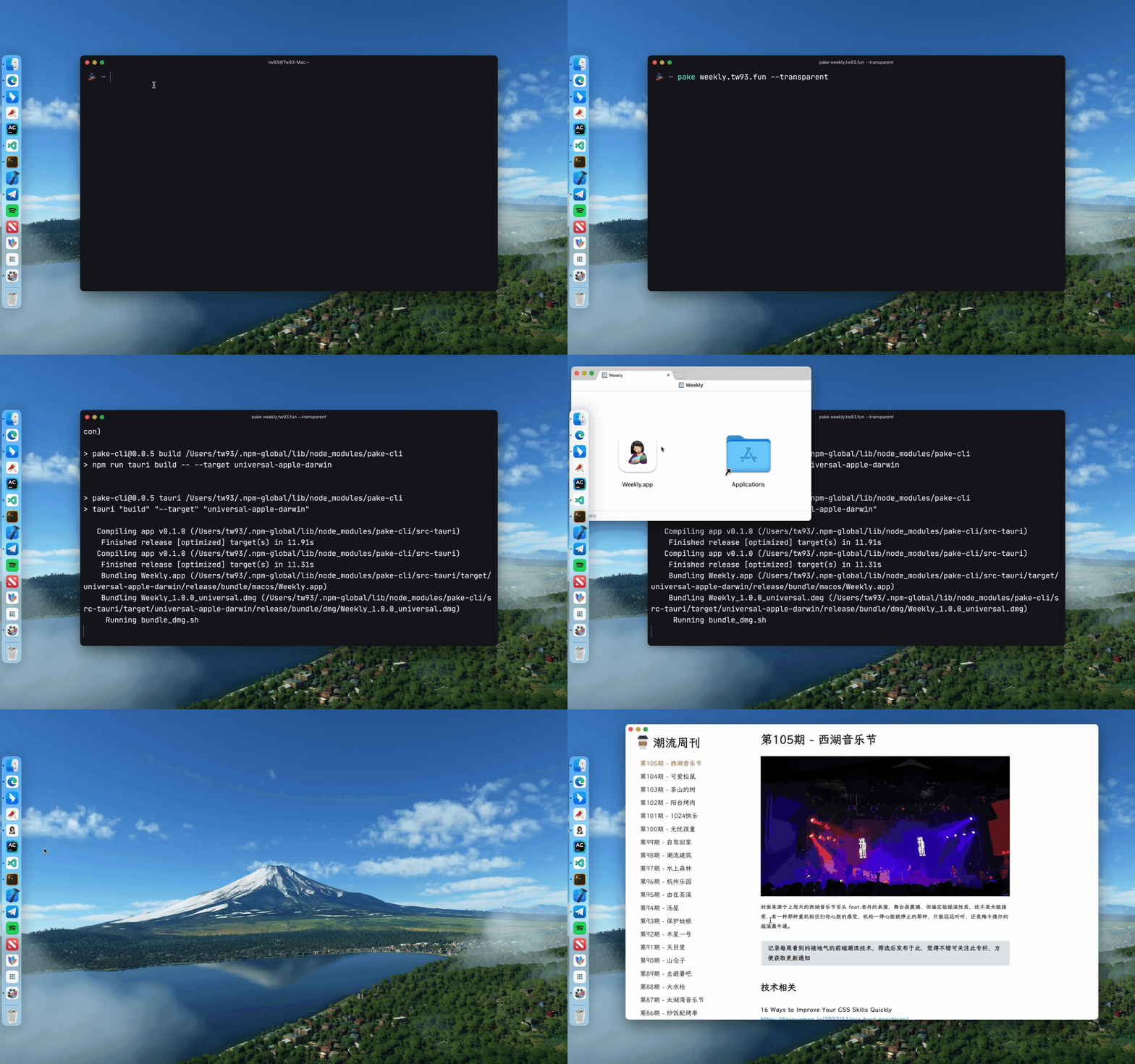
**Pake はコマンドラインツールを提供しており、必要なパッケージをより迅速かつ簡単にカスタマイズすることができます。詳細は[ドキュメント](./bin/README.md)をご覧ください。**
|
||
|
||
```bash
|
||
# npmを使用してインストール
|
||
npm install -g pake-cli
|
||
|
||
# コマンドの使用
|
||
pake url [OPTIONS]...
|
||
|
||
# Pakeを自由に試してみてください!初めての起動時は環境の準備に時間がかかる場合があります。
|
||
pake https://weekly.tw93.fun --name Weekly --hide-title-bar
|
||
```
|
||
|
||
コマンドラインの使用に不慣れな場合は、_GitHub Actions_ を使用してオンラインでパッケージをコンパイルすることができます。[チュートリアル](<https://github.com/tw93/Pake/wiki/Online-Compilation-(used-by-ordinary-users)>)をご覧ください。
|
||
|
||
## 開発
|
||
|
||
開始する前に、Rust `>=1.63` と Node `>=16` (例: `16.18.1`) がコンピュータにインストールされていることを確認してください。インストールガイドについては、[Tauri ドキュメント](https://tauri.app/v1/guides/getting-started/prerequisites)を参照してください。
|
||
|
||
これらに不慣れな場合は、上記のツールを使用してワンクリックでパッケージを作成することをお勧めします。
|
||
|
||
```sh
|
||
# 依存関係のインストール
|
||
npm i
|
||
|
||
# ローカル開発 [右クリックでデバッグモードを開く]
|
||
npm run dev
|
||
|
||
# アプリケーションのパッケージング
|
||
npm run build
|
||
```
|
||
|
||
## 高度な使用法
|
||
|
||
1. [コードベースの構造](https://github.com/tw93/Pake/wiki/Description-of-Pake's-code-structure)を参照して、開発前により多くの情報を得ることができます。
|
||
2. `src-tauri` ディレクトリ内の `pake.json` ファイルの `url` と `productName` フィールドを変更する場合は、`tauri.config.json` ファイル内の `domain` フィールド、および `tauri.xxx.conf.json` ファイル内の `icon` と `identifier` フィールドを同期して変更する必要があります。`icon` は `icons` ディレクトリから選択することも、[macOSicons](https://macosicons.com/#/) から効果に合ったものをダウンロードすることもできます。
|
||
3. ウィンドウプロパティの設定については、`pake.json` ファイルを変更して `windows` プロパティの `width`、`height`、`fullscreen`(またはしない)、`resizable`(またはしない)の値を変更できます。Mac の没入型ヘッダーに適応するには、`hideTitleBar` を `true` に設定し、`Header` 要素を見つけて `padding-top` プロパティを追加します。
|
||
4. スタイルの書き換え、広告の除去、JS の注入、コンテナメッセージ通信、ユーザー定義のショートカットキーについては、[高度な使用法](https://github.com/tw93/Pake/wiki/Advanced-Usage-of-Pake)を参照してください。
|
||
|
||
## 開発者
|
||
|
||
Pake の開発はこれらのハッカーたちなしにはあり得ませんでした。彼らは Pake のために多くの能力を貢献しました。彼らをフォローすることも歓迎します!❤️
|
||
|
||
<!-- readme: contributors -start -->
|
||
<table>
|
||
<tr>
|
||
<td align="center">
|
||
<a href="https://github.com/tw93">
|
||
<img src="https://avatars.githubusercontent.com/u/8736212?v=4" width="90;" alt="tw93"/>
|
||
<br />
|
||
<sub><b>Tw93</b></sub>
|
||
</a>
|
||
</td>
|
||
<td align="center">
|
||
<a href="https://github.com/Tlntin">
|
||
<img src="https://avatars.githubusercontent.com/u/28218658?v=4" width="90;" alt="Tlntin"/>
|
||
<br />
|
||
<sub><b>Tlntin</b></sub>
|
||
</a>
|
||
</td>
|
||
<td align="center">
|
||
<a href="https://github.com/jeasonnow">
|
||
<img src="https://avatars.githubusercontent.com/u/16950207?v=4" width="90;" alt="jeasonnow"/>
|
||
<br />
|
||
<sub><b>Santree</b></sub>
|
||
</a>
|
||
</td>
|
||
<td align="center">
|
||
<a href="https://github.com/pan93412">
|
||
<img src="https://avatars.githubusercontent.com/u/28441561?v=4" width="90;" alt="pan93412"/>
|
||
<br />
|
||
<sub><b>Pan93412</b></sub>
|
||
</a>
|
||
</td>
|
||
<td align="center">
|
||
<a href="https://github.com/wanghanzhen">
|
||
<img src="https://avatars.githubusercontent.com/u/25301012?v=4" width="90;" alt="wanghanzhen"/>
|
||
<br />
|
||
<sub><b>Volare</b></sub>
|
||
</a>
|
||
</td>
|
||
<td align="center">
|
||
<a href="https://github.com/liby">
|
||
<img src="https://avatars.githubusercontent.com/u/38807139?v=4" width="90;" alt="liby"/>
|
||
<br />
|
||
<sub><b>Bryan Lee</b></sub>
|
||
</a>
|
||
</td>
|
||
<td align="center">
|
||
<a href="https://github.com/essesoul">
|
||
<img src="https://avatars.githubusercontent.com/u/58624474?v=4" width="90;" alt="essesoul"/>
|
||
<br />
|
||
<sub><b>Essesoul</b></sub>
|
||
</a>
|
||
</td></tr>
|
||
<tr>
|
||
<td align="center">
|
||
<a href="https://github.com/YangguangZhou">
|
||
<img src="https://avatars.githubusercontent.com/u/61733195?v=4" width="90;" alt="YangguangZhou"/>
|
||
<br />
|
||
<sub><b>Jerry Zhou</b></sub>
|
||
</a>
|
||
</td>
|
||
<td align="center">
|
||
<a href="https://github.com/AielloChan">
|
||
<img src="https://avatars.githubusercontent.com/u/7900765?v=4" width="90;" alt="AielloChan"/>
|
||
<br />
|
||
<sub><b>Aiello</b></sub>
|
||
</a>
|
||
</td>
|
||
<td align="center">
|
||
<a href="https://github.com/m1911star">
|
||
<img src="https://avatars.githubusercontent.com/u/4948120?v=4" width="90;" alt="m1911star"/>
|
||
<br />
|
||
<sub><b>Horus</b></sub>
|
||
</a>
|
||
</td>
|
||
<td align="center">
|
||
<a href="https://github.com/Pake-Actions">
|
||
<img src="https://avatars.githubusercontent.com/u/126550811?v=4" width="90;" alt="Pake-Actions"/>
|
||
<br />
|
||
<sub><b>Pake Actions</b></sub>
|
||
</a>
|
||
</td>
|
||
<td align="center">
|
||
<a href="https://github.com/eltociear">
|
||
<img src="https://avatars.githubusercontent.com/u/22633385?v=4" width="90;" alt="eltociear"/>
|
||
<br />
|
||
<sub><b>Ikko Eltociear Ashimine</b></sub>
|
||
</a>
|
||
</td>
|
||
<td align="center">
|
||
<a href="https://github.com/QingZ11">
|
||
<img src="https://avatars.githubusercontent.com/u/38887077?v=4" width="90;" alt="QingZ11"/>
|
||
<br />
|
||
<sub><b>Steam</b></sub>
|
||
</a>
|
||
</td>
|
||
<td align="center">
|
||
<a href="https://github.com/exposir">
|
||
<img src="https://avatars.githubusercontent.com/u/33340988?v=4" width="90;" alt="exposir"/>
|
||
<br />
|
||
<sub><b>孟世博</b></sub>
|
||
</a>
|
||
</td></tr>
|
||
<tr>
|
||
<td align="center">
|
||
<a href="https://github.com/2nthony">
|
||
<img src="https://avatars.githubusercontent.com/u/19513289?v=4" width="90;" alt="2nthony"/>
|
||
<br />
|
||
<sub><b>2nthony</b></sub>
|
||
</a>
|
||
</td>
|
||
<td align="center">
|
||
<a href="https://github.com/ACGNnsj">
|
||
<img src="https://avatars.githubusercontent.com/u/22112141?v=4" width="90;" alt="ACGNnsj"/>
|
||
<br />
|
||
<sub><b>Null</b></sub>
|
||
</a>
|
||
</td>
|
||
<td align="center">
|
||
<a href="https://github.com/imabutahersiddik">
|
||
<img src="https://avatars.githubusercontent.com/u/138387257?v=4" width="90;" alt="imabutahersiddik"/>
|
||
<br />
|
||
<sub><b>Abu Taher Siddik</b></sub>
|
||
</a>
|
||
</td>
|
||
<td align="center">
|
||
<a href="https://github.com/kidylee">
|
||
<img src="https://avatars.githubusercontent.com/u/841310?v=4" width="90;" alt="kidylee"/>
|
||
<br />
|
||
<sub><b>An Li</b></sub>
|
||
</a>
|
||
</td>
|
||
<td align="center">
|
||
<a href="https://github.com/nekomeowww">
|
||
<img src="https://avatars.githubusercontent.com/u/11081491?v=4" width="90;" alt="nekomeowww"/>
|
||
<br />
|
||
<sub><b>Ayaka Neko</b></sub>
|
||
</a>
|
||
</td>
|
||
<td align="center">
|
||
<a href="https://github.com/turkyden">
|
||
<img src="https://avatars.githubusercontent.com/u/24560160?v=4" width="90;" alt="turkyden"/>
|
||
<br />
|
||
<sub><b>Dengju Deng</b></sub>
|
||
</a>
|
||
</td>
|
||
<td align="center">
|
||
<a href="https://github.com/Fechin">
|
||
<img src="https://avatars.githubusercontent.com/u/2541482?v=4" width="90;" alt="Fechin"/>
|
||
<br />
|
||
<sub><b>Fechin</b></sub>
|
||
</a>
|
||
</td></tr>
|
||
<tr>
|
||
<td align="center">
|
||
<a href="https://github.com/ImgBotApp">
|
||
<img src="https://avatars.githubusercontent.com/u/31427850?v=4" width="90;" alt="ImgBotApp"/>
|
||
<br />
|
||
<sub><b>Imgbot</b></sub>
|
||
</a>
|
||
</td>
|
||
<td align="center">
|
||
<a href="https://github.com/droid-Q">
|
||
<img src="https://avatars.githubusercontent.com/u/708277?v=4" width="90;" alt="droid-Q"/>
|
||
<br />
|
||
<sub><b>Jiaqi Gu</b></sub>
|
||
</a>
|
||
</td>
|
||
<td align="center">
|
||
<a href="https://github.com/mattbajorek">
|
||
<img src="https://avatars.githubusercontent.com/u/17235301?v=4" width="90;" alt="mattbajorek"/>
|
||
<br />
|
||
<sub><b>Matt Bajorek</b></sub>
|
||
</a>
|
||
</td>
|
||
<td align="center">
|
||
<a href="https://github.com/Milo123459">
|
||
<img src="https://avatars.githubusercontent.com/u/50248166?v=4" width="90;" alt="Milo123459"/>
|
||
<br />
|
||
<sub><b>Milo</b></sub>
|
||
</a>
|
||
</td>
|
||
<td align="center">
|
||
<a href="https://github.com/princemaple">
|
||
<img src="https://avatars.githubusercontent.com/u/1329716?v=4" width="90;" alt="princemaple"/>
|
||
<br />
|
||
<sub><b>Po Chen</b></sub>
|
||
</a>
|
||
</td>
|
||
<td align="center">
|
||
<a href="https://github.com/Tianj0o">
|
||
<img src="https://avatars.githubusercontent.com/u/68584284?v=4" width="90;" alt="Tianj0o"/>
|
||
<br />
|
||
<sub><b>Qitianjia</b></sub>
|
||
</a>
|
||
</td>
|
||
<td align="center">
|
||
<a href="https://github.com/geekvest">
|
||
<img src="https://avatars.githubusercontent.com/u/126322776?v=4" width="90;" alt="geekvest"/>
|
||
<br />
|
||
<sub><b>Null</b></sub>
|
||
</a>
|
||
</td></tr>
|
||
<tr>
|
||
<td align="center">
|
||
<a href="https://github.com/houhoz">
|
||
<img src="https://avatars.githubusercontent.com/u/19684376?v=4" width="90;" alt="houhoz"/>
|
||
<br />
|
||
<sub><b>Hyzhao</b></sub>
|
||
</a>
|
||
</td>
|
||
<td align="center">
|
||
<a href="https://github.com/lakca">
|
||
<img src="https://avatars.githubusercontent.com/u/16255922?v=4" width="90;" alt="lakca"/>
|
||
<br />
|
||
<sub><b>Null</b></sub>
|
||
</a>
|
||
</td>
|
||
<td align="center">
|
||
<a href="https://github.com/liudonghua123">
|
||
<img src="https://avatars.githubusercontent.com/u/2276718?v=4" width="90;" alt="liudonghua123"/>
|
||
<br />
|
||
<sub><b>Liudonghua</b></sub>
|
||
</a>
|
||
</td>
|
||
<td align="center">
|
||
<a href="https://github.com/liusishan">
|
||
<img src="https://avatars.githubusercontent.com/u/33129823?v=4" width="90;" alt="liusishan"/>
|
||
<br />
|
||
<sub><b>Liusishan</b></sub>
|
||
</a>
|
||
</td>
|
||
<td align="center">
|
||
<a href="https://github.com/piaoyidage">
|
||
<img src="https://avatars.githubusercontent.com/u/5135405?v=4" width="90;" alt="piaoyidage"/>
|
||
<br />
|
||
<sub><b>Ranger</b></sub>
|
||
</a>
|
||
</td>
|
||
<td align="center">
|
||
<a href="https://github.com/hetz">
|
||
<img src="https://avatars.githubusercontent.com/u/820141?v=4" width="90;" alt="hetz"/>
|
||
<br />
|
||
<sub><b>贺天卓</b></sub>
|
||
</a>
|
||
</td></tr>
|
||
</table>
|
||
<!-- readme: contributors -end -->
|
||
|
||
## よくある質問
|
||
|
||
1. ページ内の画像要素を右クリックしてメニューを開き、「画像をダウンロード」または他のイベントを選択しても機能しない(MacOS システムで一般的)。この問題は、MacOS の組み込み webview がこの機能をサポートしていないためです。
|
||
|
||
## サポート
|
||
|
||
1. 私には汤圆と可乐という 2 匹の猫がいます。Pake があなたの生活をより良くしてくれると思ったら、<a href="https://miaoyan.app/cats.html?name=Pake" target="_blank">缶詰をあげてください 🥩</a>。
|
||
2. Pake が気に入ったら、GitHub でスターをつけてください。また、友達に<a href="https://twitter.com/intent/tweet?url=https://github.com/tw93/Pake&text=%23Pake%20-%20Rust%E3%82%92%E4%BD%BF%E3%81%A3%E3%81%A6%E3%80%81%E7%B0%A1%E5%8D%98%E3%81%AB%E3%82%A6%E3%82%A7%E3%83%96%E3%83%9A%E3%83%BC%E3%82%B8%E3%82%92%E3%83%87%E3%82%B9%E3%82%AF%E3%83%88%E3%83%83%E3%83%97%E3%82%A2%E3%83%97%E3%83%AA%E3%81%AB%E5%A4%89%E6%8F%9B%E3%81%99%E3%82%8B%E3%83%84%E3%83%BC%E3%83%AB%E3%80%82Electron%E3%83%91%E3%83%83%E3%82%B1%E3%83%BC%E3%82%B8%E3%81%A8%E6%AF%94%E8%BC%83%E3%81%97%E3%81%A6%E3%80%81%E7%B4%84%2040%E5%80%8D%E5%B0%8F%E3%81%95%E3%81%84%E3%80%81%E4%B8%80%E8%88%AC%E7%B4%842M%E3%80%81Tauri%E3%82%92%E4%BD%BF%E7%94%A8%E3%81%97%E3%81%A6%E3%81%84%E3%82%8B%E3%81%9F%E3%82%81%E3%80%81JS%E3%83%95%E3%83%AC%E3%83%BC%E3%83%A0%E3%83%AF%E3%83%BC%E3%82%AF%E3%82%88%E3%82%8A%E3%82%82%E3%81%AF%E3%82%8B%E3%81%8B%E3%81%AB%E8%BB%BD%E9%87%8F%E3%81%A7%E9%AB%98%E9%80%9F%E3%81%A7%E3%81%99%E3%80%82">推薦</a>することを歓迎します。
|
||
3. 私の<a href="https://twitter.com/HiTw93">Twitter</a>をフォローして、Pake の最新情報を入手することができます。また、<a href="https://t.me/+GclQS9ZnxyI2ODQ1">Telegram</a>のチャットグループに参加することもできます。
|
||
4. 皆さんが楽しんでいただけることを願っています。Mac アプリに適したウェブサイトを見つけたら、ぜひ教えてください。
|