
207 lines
12 KiB
Markdown
207 lines
12 KiB
Markdown
<h4 align="right"><strong>English</strong> | <a href="README_CN.md">简体中文</a> | <a href="README_JP.md">日本語</a></h4>
|
|
<p align="center">
|
|
<img src=https://gw.alipayobjects.com/zos/k/fa/logo-modified.png width=138/>
|
|
</p>
|
|
<h1 align="center">Pake</h1>
|
|
<p align="center"><strong>Turn any webpage into a desktop app with one command, supports macOS, Windows, and Linux</strong></p>
|
|
<div align="center">
|
|
<a href="https://twitter.com/HiTw93" target="_blank">
|
|
<img alt="twitter" src="https://img.shields.io/badge/follow-Tw93-red?style=flat-square&logo=Twitter"></a>
|
|
<a href="https://t.me/+GclQS9ZnxyI2ODQ1" target="_blank">
|
|
<img alt="telegram" src="https://img.shields.io/badge/chat-telegram-blueviolet?style=flat-square&logo=Telegram"></a>
|
|
<a href="https://github.com/tw93/Pake/releases" target="_blank">
|
|
<img alt="GitHub downloads" src="https://img.shields.io/github/downloads/tw93/Pake/total.svg?style=flat-square"></a>
|
|
<a href="https://github.com/tw93/Pake/commits" target="_blank">
|
|
<img alt="GitHub commit" src="https://img.shields.io/github/commit-activity/m/tw93/Pake?style=flat-square"></a>
|
|
<a href="https://github.com/tw93/Pake/issues?q=is%3Aissue+is%3Aclosed" target="_blank">
|
|
<img alt="GitHub closed issues" src="https://img.shields.io/github/issues-closed/tw93/Pake.svg?style=flat-square"></a>
|
|
</div>
|
|
|
|
## Features
|
|
|
|
- 🎐 **Lightweight**: Nearly 20 times smaller than Electron packages, typically around 5M
|
|
- 🚀 **Fast**: Built with Rust Tauri, much faster than traditional JS frameworks with lower memory usage
|
|
- ⚡ **Easy to use**: One-command packaging via CLI or online building, no complex configuration needed
|
|
- 📦 **Feature-rich**: Supports shortcuts, immersive windows, drag & drop, style customization, ad removal
|
|
|
|
## Getting Started
|
|
|
|
- **Beginners**: Download ready-made [Popular Packages](#popular-packages) or use [Online Building](docs/github-actions-usage.md) with no environment setup required
|
|
- **Developers**: Install [CLI Tool](docs/cli-usage.md) for one-command packaging of any website with customizable icons, window settings, and more
|
|
- **Advanced Users**: Clone the project locally for [Custom Development](#development), or check [Advanced Usage](docs/advanced-usage.md) for style customization and feature enhancement
|
|
- **Troubleshooting**: Check [FAQ](docs/faq.md) for common issues and solutions
|
|
|
|
## Popular Packages
|
|
|
|
<table>
|
|
<tr>
|
|
<td>WeRead
|
|
<a href="https://github.com/tw93/Pake/releases/latest/download/WeRead.dmg">Mac</a>
|
|
<a href="https://github.com/tw93/Pake/releases/latest/download/WeRead_x64.msi">Windows</a>
|
|
<a href="https://github.com/tw93/Pake/releases/latest/download/WeRead_x86_64.deb">Linux</a>
|
|
</td>
|
|
<td>Twitter
|
|
<a href="https://github.com/tw93/Pake/releases/latest/download/Twitter.dmg">Mac</a>
|
|
<a href="https://github.com/tw93/Pake/releases/latest/download/Twitter_x64.msi">Windows</a>
|
|
<a href="https://github.com/tw93/Pake/releases/latest/download/Twitter_x86_64.deb">Linux</a>
|
|
</td>
|
|
</tr>
|
|
<tr>
|
|
<td><img src=https://raw.githubusercontent.com/tw93/static/main/pake/WeRead.jpg width=600/></td>
|
|
<td><img src=https://raw.githubusercontent.com/tw93/static/main/pake/Twitter.jpg width=600/></td>
|
|
</tr>
|
|
<tr>
|
|
<td>Grok
|
|
<a href="https://github.com/tw93/Pake/releases/latest/download/Grok.dmg">Mac</a>
|
|
<a href="https://github.com/tw93/Pake/releases/latest/download/Grok_x64.msi">Windows</a>
|
|
<a href="https://github.com/tw93/Pake/releases/latest/download/Grok_x86_64.deb">Linux</a>
|
|
</td>
|
|
<td>DeepSeek
|
|
<a href="https://github.com/tw93/Pake/releases/latest/download/DeepSeek.dmg">Mac</a>
|
|
<a href="https://github.com/tw93/Pake/releases/latest/download/DeepSeek_x64.msi">Windows</a>
|
|
<a href="https://github.com/tw93/Pake/releases/latest/download/DeepSeek_x86_64.deb">Linux</a>
|
|
</td>
|
|
</tr>
|
|
<tr>
|
|
<td><img src=https://raw.githubusercontent.com/tw93/static/main/pake/Grok.png width=600/></td>
|
|
<td><img src=https://raw.githubusercontent.com/tw93/static/main/pake/DeepSeek.png width=600/></td>
|
|
</tr>
|
|
<tr>
|
|
<td>ChatGPT
|
|
<a href="https://github.com/tw93/Pake/releases/latest/download/ChatGPT.dmg">Mac</a>
|
|
<a href="https://github.com/tw93/Pake/releases/latest/download/ChatGPT_x64.msi">Windows</a>
|
|
<a href="https://github.com/tw93/Pake/releases/latest/download/ChatGPT_x86_64.deb">Linux</a>
|
|
</td>
|
|
<td>Gemini
|
|
<a href="https://github.com/tw93/Pake/releases/latest/download/Gemini.dmg">Mac</a>
|
|
<a href="https://github.com/tw93/Pake/releases/latest/download/Gemini_x64.msi">Windows</a>
|
|
<a href="https://github.com/tw93/Pake/releases/latest/download/Gemini_x86_64.deb">Linux</a>
|
|
</td>
|
|
</tr>
|
|
<tr>
|
|
<td><img src=https://raw.githubusercontent.com/tw93/static/main/pake/ChatGPT.png width=600/></td>
|
|
<td><img src=https://raw.githubusercontent.com/tw93/static/main/pake/Gemini.png width=600/></td>
|
|
</tr>
|
|
<tr>
|
|
<td>YouTube Music
|
|
<a href="https://github.com/tw93/Pake/releases/latest/download/YouTubeMusic.dmg">Mac</a>
|
|
<a href="https://github.com/tw93/Pake/releases/latest/download/YouTubeMusic_x64.msi">Windows</a>
|
|
<a href="https://github.com/tw93/Pake/releases/latest/download/YouTubeMusic_x86_64.deb">Linux</a>
|
|
</td>
|
|
<td>YouTube
|
|
<a href="https://github.com/tw93/Pake/releases/latest/download/YouTube.dmg">Mac</a>
|
|
<a href="https://github.com/tw93/Pake/releases/latest/download/YouTube_x64.msi">Windows</a>
|
|
<a href="https://github.com/tw93/Pake/releases/latest/download/YouTube_x86_64.deb">Linux</a>
|
|
</td>
|
|
</tr>
|
|
<tr>
|
|
<td><img src=https://raw.githubusercontent.com/tw93/static/main/pake/YouTubeMusic.png width=600 /></td>
|
|
<td><img src=https://raw.githubusercontent.com/tw93/static/main/pake/YouTube.jpg width=600 /></td>
|
|
</tr>
|
|
<tr>
|
|
<td>LiZhi
|
|
<a href="https://github.com/tw93/Pake/releases/latest/download/LiZhi.dmg">Mac</a>
|
|
<a href="https://github.com/tw93/Pake/releases/latest/download/LiZhi_x64.msi">Windows</a>
|
|
<a href="https://github.com/tw93/Pake/releases/latest/download/LiZhi_x86_64.deb">Linux</a>
|
|
</td>
|
|
<td>ProgramMusic
|
|
<a href="https://github.com/tw93/Pake/releases/latest/download/ProgramMusic.dmg">Mac</a>
|
|
<a href="https://github.com/tw93/Pake/releases/latest/download/ProgramMusic_x64.msi">Windows</a>
|
|
<a href="https://github.com/tw93/Pake/releases/latest/download/ProgramMusic_x86_64.deb">Linux</a>
|
|
</td>
|
|
</tr>
|
|
<tr>
|
|
<td><img src=https://raw.githubusercontent.com/tw93/static/main/pake/LiZhi.jpg width=600/></td>
|
|
<td><img src=https://raw.githubusercontent.com/tw93/static/main/pake/ProgramMusic.jpg width=600/></td>
|
|
</tr>
|
|
<tr>
|
|
<td>Excalidraw
|
|
<a href="https://github.com/tw93/Pake/releases/latest/download/Excalidraw.dmg">Mac</a>
|
|
<a href="https://github.com/tw93/Pake/releases/latest/download/Excalidraw_x64.msi">Windows</a>
|
|
<a href="https://github.com/tw93/Pake/releases/latest/download/Excalidraw_x86_64.deb">Linux</a>
|
|
</td>
|
|
<td>XiaoHongShu
|
|
<a href="https://github.com/tw93/Pake/releases/latest/download/XiaoHongShu.dmg">Mac</a>
|
|
<a href="https://github.com/tw93/Pake/releases/latest/download/XiaoHongShu_x64.msi">Windows</a>
|
|
<a href="https://github.com/tw93/Pake/releases/latest/download/XiaoHongShu_x86_64.deb">Linux</a>
|
|
</td>
|
|
</tr>
|
|
<tr>
|
|
<td><img src=https://raw.githubusercontent.com/tw93/static/main/pake/Excalidraw.png width=600/></td>
|
|
<td><img src=https://raw.githubusercontent.com/tw93/static/main/pake/XiaoHongShu.png width=600/></td>
|
|
</tr>
|
|
</table>
|
|
|
|
<details>
|
|
<summary>🏂 You can download more applications from <a href="https://github.com/tw93/Pake/releases">Releases</a>. <b>Click here to expand the shortcuts reference!</b></summary>
|
|
|
|
<br/>
|
|
|
|
| Mac | Windows/Linux | Function |
|
|
| --------------------------- | ------------------------------ | ----------------------------- |
|
|
| <kbd>⌘</kbd> + <kbd>[</kbd> | <kbd>Ctrl</kbd> + <kbd>←</kbd> | Return to the previous page |
|
|
| <kbd>⌘</kbd> + <kbd>]</kbd> | <kbd>Ctrl</kbd> + <kbd>→</kbd> | Go to the next page |
|
|
| <kbd>⌘</kbd> + <kbd>↑</kbd> | <kbd>Ctrl</kbd> + <kbd>↑</kbd> | Auto scroll to top of page |
|
|
| <kbd>⌘</kbd> + <kbd>↓</kbd> | <kbd>Ctrl</kbd> + <kbd>↓</kbd> | Auto scroll to bottom of page |
|
|
| <kbd>⌘</kbd> + <kbd>r</kbd> | <kbd>Ctrl</kbd> + <kbd>r</kbd> | Refresh Page |
|
|
| <kbd>⌘</kbd> + <kbd>w</kbd> | <kbd>Ctrl</kbd> + <kbd>w</kbd> | Hide window, not quit |
|
|
| <kbd>⌘</kbd> + <kbd>-</kbd> | <kbd>Ctrl</kbd> + <kbd>-</kbd> | Zoom out the page |
|
|
| <kbd>⌘</kbd> + <kbd>+</kbd> | <kbd>Ctrl</kbd> + <kbd>+</kbd> | Zoom in the page |
|
|
| <kbd>⌘</kbd> + <kbd>=</kbd> | <kbd>Ctrl</kbd> + <kbd>=</kbd> | Zoom in the Page |
|
|
| <kbd>⌘</kbd> + <kbd>0</kbd> | <kbd>Ctrl</kbd> + <kbd>0</kbd> | Reset the page zoom |
|
|
|
|
In addition, double-click the title bar to switch to full-screen mode. For Mac users, you can also use the gesture to go to the previous or next page and drag the title bar to move the window.
|
|
|
|
</details>
|
|
|
|
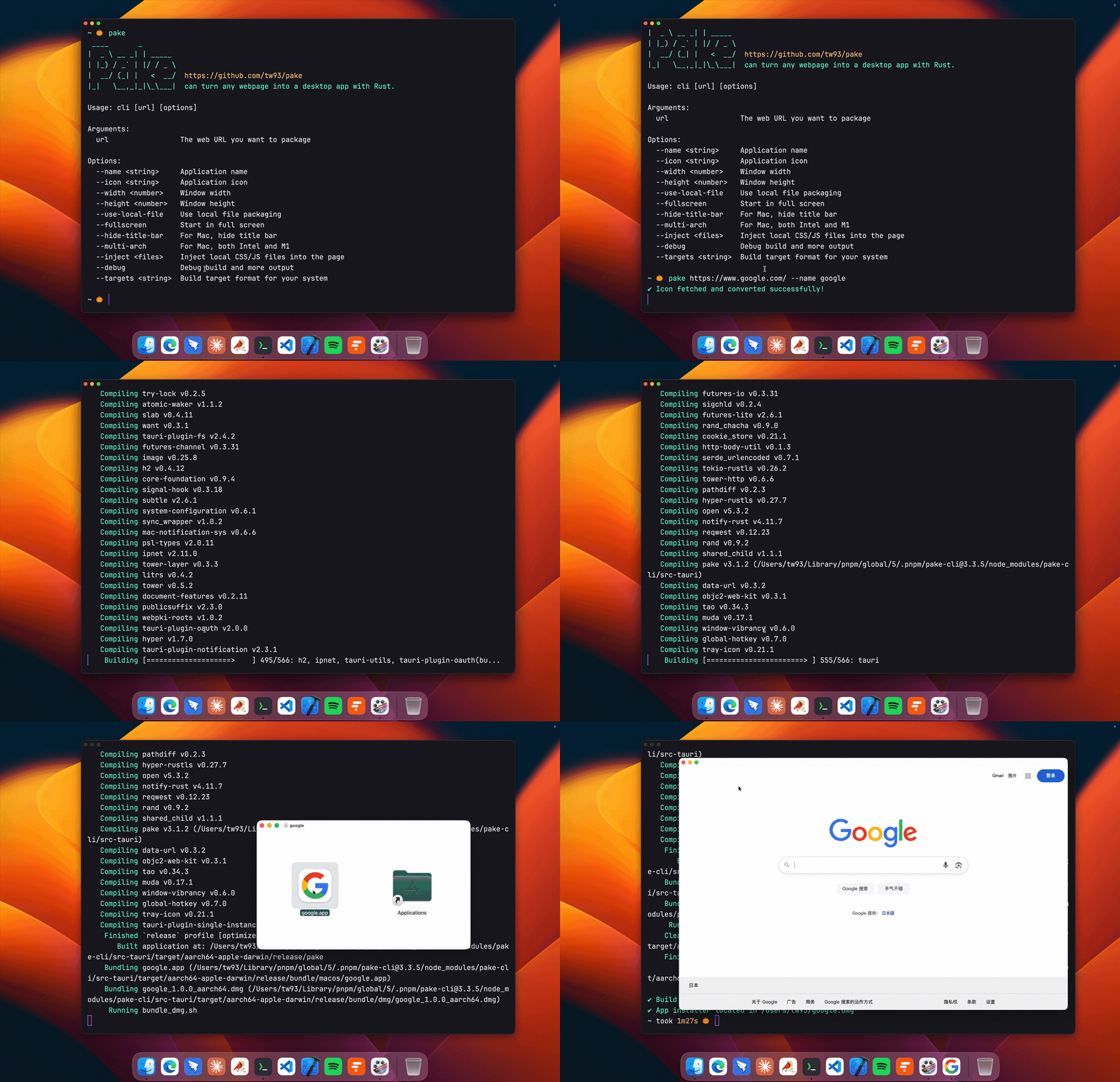
## Command-Line Packaging
|
|
|
|
|
|
|
|
```bash
|
|
# Install Pake CLI
|
|
pnpm install -g pake-cli
|
|
|
|
# Basic usage - automatically fetches website icon
|
|
pake https://github.com --name GitHub
|
|
|
|
# Advanced usage with custom options
|
|
pake https://weekly.tw93.fun --name Weekly --icon https://cdn.tw93.fun/pake/weekly.icns --width 1200 --height 800 --hide-title-bar
|
|
```
|
|
|
|
First-time packaging requires environment setup and may be slower, subsequent builds are fast. For complete parameter documentation, see [CLI Usage Guide](docs/cli-usage.md). Don't want to use CLI? Try [GitHub Actions Online Building](docs/github-actions-usage.md).
|
|
|
|
## Development
|
|
|
|
Requires Rust `>=1.85` and Node `>=22`. For detailed installation guide, see [Tauri documentation](https://tauri.app/start/prerequisites/). If unfamiliar with development environment, use the CLI tool instead.
|
|
|
|
```bash
|
|
# Install dependencies
|
|
pnpm i
|
|
|
|
# Local development [right-click to open debug mode]
|
|
pnpm run dev
|
|
|
|
# Build application
|
|
pnpm run build
|
|
```
|
|
|
|
For style customization, feature enhancement, container communication and other advanced features, see [Advanced Usage Documentation](docs/advanced-usage.md).
|
|
|
|
## Developers
|
|
|
|
Pake's development can not be without these Hackers. They contributed a lot of capabilities for Pake. Also, welcome to follow them! ❤️
|
|
|
|
<a href="https://github.com/tw93/Pake/graphs/contributors">
|
|
<img src="https://raw.githubusercontent.com/tw93/Pake/main/CONTRIBUTORS.svg?sanitize=true" alt="Contributors" width="1000" />
|
|
</a>
|
|
|
|
## Support
|
|
|
|
<a href="https://miaoyan.app/cats.html?name=Pake"><img src="https://miaoyan.app/assets/sponsors.svg" width="1000px" /></a>
|
|
|
|
1. I have two cats, TangYuan and Coke. If you think Pake delights your life, you can feed them <a href="https://miaoyan.app/cats.html?name=Pake" target="_blank">food 🥩</a>.
|
|
2. If you like Pake, you can star it on GitHub. Also, welcome to [recommend Pake](https://twitter.com/intent/tweet?url=https://github.com/tw93/Pake&text=Pake%20-%20Turn%20any%20webpage%20into%20a%20desktop%20app%20with%20one%20command.%20Nearly%2020x%20smaller%20than%20Electron%20packages,%20supports%20macOS%20Windows%20Linux) to your friends.
|
|
3. You can follow my [Twitter](https://twitter.com/HiTw93) to get the latest news of Pake or join our [Telegram](https://t.me/+GclQS9ZnxyI2ODQ1) chat group.
|
|
4. I hope that you enjoy playing with it. Let us know if you find a website that would be great for a Mac App!
|