
109 lines
4.4 KiB
Markdown
109 lines
4.4 KiB
Markdown
# 4.1 Process form inputs
|
|
|
|
Before we begin, let's take a look at a simple example of a typical user form, saved as `login.gtpl` in your project folder.
|
|
```html
|
|
<html>
|
|
<head>
|
|
<title></title>
|
|
</head>
|
|
<body>
|
|
<form action="/login" method="post">
|
|
Username:<input type="text" name="username">
|
|
Password:<input type="password" name="password">
|
|
<input type="submit" value="Login">
|
|
</form>
|
|
</body>
|
|
</html>
|
|
```
|
|
This form will submit to `/login` on the server. After the user clicks the login button, the data will be sent to the `login` handler registered by the server router. Then we need to know whether it uses the POST method or GET.
|
|
|
|
This is easy to find out using the `http` package. Let's see how to handle the form data on the login page.
|
|
|
|
```Go
|
|
package main
|
|
|
|
import (
|
|
"fmt"
|
|
"html/template"
|
|
"log"
|
|
"net/http"
|
|
"strings"
|
|
)
|
|
|
|
func sayhelloName(w http.ResponseWriter, r *http.Request) {
|
|
r.ParseForm() //Parse url parameters passed, then parse the response packet for the POST body (request body)
|
|
// attention: If you do not call ParseForm method, the following data can not be obtained form
|
|
fmt.Println(r.Form) // print information on server side.
|
|
fmt.Println("path", r.URL.Path)
|
|
fmt.Println("scheme", r.URL.Scheme)
|
|
fmt.Println(r.Form["url_long"])
|
|
for k, v := range r.Form {
|
|
fmt.Println("key:", k)
|
|
fmt.Println("val:", strings.Join(v, ""))
|
|
}
|
|
fmt.Fprintf(w, "Hello astaxie!") // write data to response
|
|
}
|
|
|
|
func login(w http.ResponseWriter, r *http.Request) {
|
|
fmt.Println("method:", r.Method) //get request method
|
|
if r.Method == "GET" {
|
|
t, _ := template.ParseFiles("login.gtpl")
|
|
t.Execute(w, nil)
|
|
} else {
|
|
r.ParseForm()
|
|
// logic part of log in
|
|
fmt.Println("username:", r.Form["username"])
|
|
fmt.Println("password:", r.Form["password"])
|
|
}
|
|
}
|
|
|
|
func main() {
|
|
http.HandleFunc("/", sayhelloName) // setting router rule
|
|
http.HandleFunc("/login", login)
|
|
err := http.ListenAndServe(":9090", nil) // setting listening port
|
|
if err != nil {
|
|
log.Fatal("ListenAndServe: ", err)
|
|
}
|
|
}
|
|
|
|
```
|
|
Here we use `r.Method` to get the request method, and it returns an http verb -"GET", "POST", "PUT", etc.
|
|
|
|
In the `login` function, we use `r.Method` to check whether it's a login page or login processing logic. In other words, we check to see whether the user is simply opening the page, or trying to log in. Serve shows the page only when the request comes in via the GET method, and it executes the login logic when the request uses the POST method.
|
|
|
|
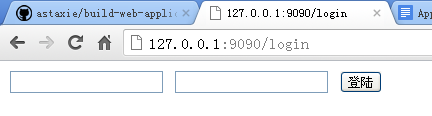
You should see the following interface after opening `http://127.0.0.1:9090/login` in your browser.
|
|
|
|
|
|
|
|
Figure 4.1 User login interface
|
|
|
|
The server will not print anything until after we type in a username and password, because the handler doesn't parse the form until we call `r.ParseForm()`. Let's add `r.ParseForm()` before `fmt.Println("username:", r.Form["username"])`, compile our program and test it again. You will find that the information is printed on the server side now.
|
|
|
|
`r.Form` contains all of the request arguments, for instance the query-string in the URL and the data in POST and PUT. If the data has conflicts, for example parameters that have the same name, the server will save the data into a slice with multiple values. The Go documentation states that Go will save the data from GET and POST requests in different places.
|
|
|
|
Try changing the value of the action in the form `http://127.0.0.1:9090/login` to `http://127.0.0.1:9090/login?username=astaxie` in the `login.gtpl` file, test it again, and you will see that the slice is printed on the server side.
|
|
|
|

|
|
|
|
Figure 4.2 Server prints request data
|
|
|
|
The type of `request.Form` is `url.Values`. It saves data with the format `key=value`.
|
|
```Go
|
|
v := url.Values{}
|
|
v.Set("name", "Ava")
|
|
v.Add("friend", "Jess")
|
|
v.Add("friend", "Sarah")
|
|
v.Add("friend", "Zoe")
|
|
// v.Encode() == "name=Ava&friend=Jess&friend=Sarah&friend=Zoe"
|
|
fmt.Println(v.Get("name"))
|
|
fmt.Println(v.Get("friend"))
|
|
fmt.Println(v["friend"])
|
|
```
|
|
**Tips** Requests have the ability to access form data using the `FormValue()` method. For example, you can change `r.Form["username"]` to `r.FormValue("username")`, and Go calls `r.ParseForm` automatically. Notice that it returns the first value if there are arguments with the same name, and it returns an empty string if there is no such argument.
|
|
|
|
## Links
|
|
|
|
- [Directory](preface.md)
|
|
- Previous section: [User form](04.0.md)
|
|
- Next section: [Verification of inputs](04.2.md)
|