
457 lines
17 KiB
Markdown
457 lines
17 KiB
Markdown
# 2.2 Go foundation
|
||
|
||
In this section, we are going to teach you how to define constants, variables with elementary types and some skills in Go programming.
|
||
|
||
## Define variables
|
||
|
||
There are many forms of syntax that can define variables in Go.
|
||
|
||
Use keyword `var` is the basic form to define variables, notice that Go puts variable type `after` variable name.
|
||
|
||
// define a variable with name “variableName” and type "type"
|
||
var variableName type
|
||
|
||
Define multiple variables.
|
||
|
||
// define three variables which types are "type"
|
||
var vname1, vname2, vname3 type
|
||
|
||
Define a variable with initial value.
|
||
|
||
// define a variable with name “variableName”, type "type" and value "value"
|
||
var variableName type = value
|
||
|
||
Define multiple variables with initial values.
|
||
|
||
/*
|
||
Define three variables with type "type", and initialize their values.
|
||
vname1 is v1, vname2 is v2, vname3 is v3
|
||
*/
|
||
var vname1, vname2, vname3 type = v1, v2, v3
|
||
|
||
Do you think it's too tedious to define variables use the way above? Don't worry because Go team found this problem as well. Therefore if you want to define variables with initial values, we can just omit variable type, so the code will look like this:
|
||
|
||
/*
|
||
Define three variables with type "type", and initialize their values.
|
||
vname1 is v1,vname2 is v2,vname3 is v3
|
||
*/
|
||
var vname1, vname2, vname3 = v1, v2, v3
|
||
|
||
Well, I know this is still not simple enough for you, so do I. Let's see how we fix it.
|
||
|
||
/*
|
||
Define three variables with type "type", and initialize their values.
|
||
vname1 is v1,vname2 is v2,vname3 is v3
|
||
*/
|
||
vname1, vname2, vname3 := v1, v2, v3
|
||
|
||
Now it looks much better. Use `:=` to replace `var` and `type`, this is called brief statement. But wait, it has one limitation that this form can only be used inside of functions. You will get compile errors if you try to use it outside of function bodies. Therefore, we usually use `var` to define global variables, and we can use this brief statement in `var()`.
|
||
|
||
`_` (blank) is a special name of variable, any value that is given to it will be ignored. For example, we give `35` to `b`, and discard `34`.( ***This example just show you how it works. It looks useless here because we often use this symbol when we get function return values.*** )
|
||
|
||
_, b := 34, 35
|
||
|
||
If you don't use any variable that you defined in the program, compiler will give you compile errors. Try to compile following code, see what happens.
|
||
|
||
package main
|
||
|
||
func main() {
|
||
var i int
|
||
}
|
||
|
||
## Constants
|
||
|
||
So-called constants are the values that are determined in the compile time, and you cannot change them during runtime. In Go, you can use number, boolean or string as type of constants.
|
||
|
||
Define constants as follows.
|
||
|
||
const constantName = value
|
||
// you can assign type of constants if it's necessary
|
||
const Pi float32 = 3.1415926
|
||
|
||
More examples.
|
||
|
||
const Pi = 3.1415926
|
||
const i = 10000
|
||
const MaxThread = 10
|
||
const prefix = "astaxie_"
|
||
|
||
## Elementary types
|
||
|
||
### Boolean
|
||
|
||
In Go, we use `bool` to define a variable as boolean type, the value can only be `true` or `false`, and `false` will be the default value. ( ***You cannot convert variables' type between number and boolean!*** )
|
||
|
||
// sample code
|
||
var isActive bool // global variable
|
||
var enabled, disabled = true, false // omit type of variables
|
||
func test() {
|
||
var available bool // local variable
|
||
valid := false // brief statement of variable
|
||
available = true // assign value to variable
|
||
}
|
||
|
||
### Numerical types
|
||
|
||
Integer types including signed and unsigned integer types. Go has `int` and `uint` at the same time, they have same length, but specific length depends on your operating system. They use 32-bit in 32-bit operating systems, and 64-bit in 64-bit operating systems. Go also has types that have specific length including `rune`, `int8`, `int16`, `int32`, `int64`, `byte`, `uint8`, `uint16`, `uint32`, `uint64`. Note that `rune` is alias of `int32` and `byte` is alias of `uint8`.
|
||
|
||
One important thing you should know that you cannot assign values between these types, this operation will cause compile errors.
|
||
|
||
var a int8
|
||
|
||
var b int32
|
||
|
||
c := a + b
|
||
|
||
Although int has longer length than uint8, and has same length as int32, but you cannot assign values between them. ( ***c will be asserted as type `int` here*** )
|
||
|
||
Float types have `float32` and `float64`, and no type called `float`, latter one is default type if you use brief statement.
|
||
|
||
That's all? No! Go has complex number as well. `complex128` (with a 64-bit real and 64-bit imaginary part)is default type, if you need smaller type, there is one called `complex64` (with a 32-bit real and 32-bit imaginary part). Its form is `RE+IMi`, where `RE` is real part and `IM` is imaginary part, the last `i` is imaginary number. There is a example of complex number.
|
||
|
||
var c complex64 = 5+5i
|
||
//output: (5+5i)
|
||
fmt.Printf("Value is: %v", c)
|
||
|
||
### String
|
||
|
||
We just talked about that Go uses UTF-8 character set. Strings are represented by double quotes `""` or backtracks ``` `.
|
||
|
||
// sample code
|
||
var frenchHello string // basic form to define string
|
||
var emptyString string = "" // define a string with empty string
|
||
func test() {
|
||
no, yes, maybe := "no", "yes", "maybe" // brief statement
|
||
japaneseHello := "Ohaiou"
|
||
frenchHello = "Bonjour" // basic form of assign values
|
||
}
|
||
|
||
It's impossible to change string values by index, you will get errors when you compile following code.
|
||
|
||
var s string = "hello"
|
||
s[0] = 'c'
|
||
|
||
What if I really want to change just one character in a string? Try following code.
|
||
|
||
s := "hello"
|
||
c := []byte(s) // convert string to []byte type
|
||
c[0] = 'c'
|
||
s2 := string(c) // convert back to string type
|
||
fmt.Printf("%s\n", s2)
|
||
|
||
You can use operator `+` to combine two strings.
|
||
|
||
s := "hello,"
|
||
m := " world"
|
||
a := s + m
|
||
fmt.Printf("%s\n", a)
|
||
|
||
and also.
|
||
|
||
s := "hello"
|
||
s = "c" + s[1:] // you cannot change string values by index, but you can get values instead.
|
||
fmt.Printf("%s\n", s)
|
||
|
||
What if I want to have a multiple-line string?
|
||
|
||
m := `hello
|
||
world`
|
||
|
||
`` ` will not escape any characters in a string.
|
||
|
||
### Error types
|
||
|
||
Go has one `error` type for purpose of dealing with error messages. There is also a package called `errors` to handle errors.
|
||
|
||
err := errors.New("emit macho dwarf: elf header corrupted")
|
||
if err != nil {
|
||
fmt.Print(err)
|
||
}
|
||
|
||
### Underlying data structure
|
||
|
||
The following picture comes from a article about [Go data structure](http://research.swtch.com/godata) in [Russ Cox Blog](http://research.swtch.com/). As you can see, Go gives blocks in memory to store data.
|
||
|
||

|
||
|
||
Figure 2.1 Go underlying data structure
|
||
|
||
## Some skills
|
||
|
||
### Define by group
|
||
|
||
If you want to define multiple constants, variables or import packages, you can use group form.
|
||
|
||
Basic form.
|
||
|
||
import "fmt"
|
||
import "os"
|
||
|
||
const i = 100
|
||
const pi = 3.1415
|
||
const prefix = "Go_"
|
||
|
||
var i int
|
||
var pi float32
|
||
var prefix string
|
||
|
||
Group form.
|
||
|
||
import(
|
||
"fmt"
|
||
"os"
|
||
)
|
||
|
||
const(
|
||
i = 100
|
||
pi = 3.1415
|
||
prefix = "Go_"
|
||
)
|
||
|
||
var(
|
||
i int
|
||
pi float32
|
||
prefix string
|
||
)
|
||
|
||
Unless you assign the value of constant is `iota`, the first value of constant in the group `const()` will be `0`. If following constants don't assign values explicitly, their values will be the same as the last one. If the value of last constant is `iota`, the values of following constants which are not assigned are `iota` also.
|
||
|
||
### iota enumerate
|
||
|
||
Go has one keyword `iota`, this keyword is to make `enum`, it begins with `0`, increased by `1`.
|
||
|
||
const(
|
||
x = iota // x == 0
|
||
y = iota // y == 1
|
||
z = iota // z == 2
|
||
w // If there is no expression after constants name, it uses the last expression, so here is saying w = iota implicitly. Therefore w == 3, and y and x both can omit "= iota" as well.
|
||
)
|
||
|
||
const v = iota // once iota meets keyword `const`, it resets to `0`, so v = 0.
|
||
|
||
const (
|
||
e, f, g = iota, iota, iota // e=0,f=0,g=0 values of iota are same in one line.
|
||
)
|
||
|
||
### Some rules
|
||
|
||
The reason that Go is concise because it has some default behaviors.
|
||
|
||
- Any variable starts with capital letter means it will be exported, private otherwise.
|
||
- Same rule for functions and constants, no `public` or `private` keyword exists in Go.
|
||
|
||
## array, slice, map
|
||
|
||
### array
|
||
|
||
`array` is array obviously, we define them as follows.
|
||
|
||
var arr [n]type
|
||
|
||
in `[n]type`, `n` is the length of array, `type` is the type of its elements. Like other languages, we use `[]` to get or set element values in array.
|
||
|
||
var arr [10]int // an array of type int
|
||
arr[0] = 42 // array is 0-based
|
||
arr[1] = 13 // assign value to element
|
||
fmt.Printf("The first element is %d\n", arr[0]) // get element value, it returns 42
|
||
fmt.Printf("The last element is %d\n", arr[9]) //it returns default value of 10th element in this array, which is 0 in this case.
|
||
|
||
Because length is a part of array type, `[3]int` and `[4]int` are different types, so we cannot change length of arrays. When you use arrays as arguments, functions get their copies instead of references! If you want to use reference, you may want to use `slice` which we will talk about latter.
|
||
|
||
It's possible to use `:=` when you define arrays.
|
||
|
||
a := [3]int{1, 2, 3} // define a int array with 3 elements
|
||
|
||
b := [10]int{1, 2, 3} // define a int array with 10 elements, and first three are assigned, rest of them use default value 0.
|
||
|
||
c := [...]int{4, 5, 6} // use `…` replace with number of length, Go will calculate it for you.
|
||
|
||
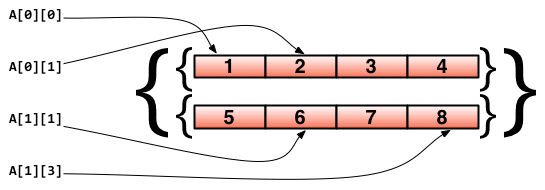
You may want to use arrays as arrays' elements, let's see how to do it.
|
||
|
||
// define a two-dimensional array with 2 elements, and each element has 4 elements.
|
||
doubleArray := [2][4]int{[4]int{1, 2, 3, 4}, [4]int{5, 6, 7, 8}}
|
||
|
||
// You can write about declaration in a shorter way.
|
||
easyArray := [2][4]int{{1, 2, 3, 4}, {5, 6, 7, 8}}
|
||
|
||
Array underlying data structure.
|
||
|
||
|
||
|
||
Figure 2.2 Multidimensional array mapping relationship
|
||
|
||
### slice
|
||
|
||
In many situations, array is not a good choice. For example, we don't know how long the array will be when we define it, so we need "dynamic array". This is called `slice` in Go.
|
||
|
||
`slice` is not really `dynamic array`, it's a reference type. `slice` points to an underlying `array`, its declaration is similar to `array`, but doesn't need length.
|
||
|
||
// just like to define array, but no length this time
|
||
var fslice []int
|
||
|
||
Then we define a `slice`, and initialize its data.
|
||
|
||
slice := []byte {'a', 'b', 'c', 'd'}
|
||
|
||
`slice` can redefine from exists slices or arrays. `slice` use `array[i:j]` to slice, where `i` is start index and `j` is end index, but notice that `array[j]` will not be sliced, now the length of slice is `j-i`.
|
||
|
||
// define a slice with 10 elements which types are byte
|
||
var ar = [10]byte {'a', 'b', 'c', 'd', 'e', 'f', 'g', 'h', 'i', 'j'}
|
||
|
||
// define two slices with type []byte
|
||
var a, b []byte
|
||
|
||
// a points to elements from 3rd to 5th in array ar.
|
||
a = ar[2:5]
|
||
// now a has elements ar[2],ar[3] and ar[4]
|
||
|
||
// b is another slice of array ar
|
||
b = ar[3:5]
|
||
// now b has elements ar[3] and ar[4]
|
||
|
||
Notice that differences between `slice` and `array` when you define them. We use `[…]` let Go calculates length but use `[]` to define slice only.
|
||
|
||
Their underlying data structure.
|
||
|
||

|
||
|
||
Figure 2.3 Correspondence between slice and array
|
||
|
||
slice has some convenient operations.
|
||
|
||
- `slice` is 0-based, `ar[:n]` equals to `ar[0:n]`
|
||
- Second index will be the length of `slice` if you omit it, `ar[n:]` equals to `ar[n:len(ar)]`.
|
||
- You can use `ar[:]` to slice whole array, reasons are explained in first two statements.
|
||
|
||
More examples about `slice`
|
||
|
||
// define an array
|
||
var array = [10]byte{'a', 'b', 'c', 'd', 'e', 'f', 'g', 'h', 'i', 'j'}
|
||
// define two slices
|
||
var aSlice, bSlice []byte
|
||
|
||
// some convenient operations
|
||
aSlice = array[:3] // equals to aSlice = array[0:3] aSlice has elements a,b,c
|
||
aSlice = array[5:] // equals to aSlice = array[5:10] aSlice has elements f,g,h,i,j
|
||
aSlice = array[:] // equals to aSlice = array[0:10] aSlice has all elements
|
||
|
||
// slice from slice
|
||
aSlice = array[3:7] // aSlice has elements d,e,f,g,len=4,cap=7
|
||
bSlice = aSlice[1:3] // bSlice contains aSlice[1], aSlice[2], so it has elements e,f
|
||
bSlice = aSlice[:3] // bSlice contains aSlice[0], aSlice[1], aSlice[2], so it has d,e,f
|
||
bSlice = aSlice[0:5] // slcie could be expanded in range of cap, now bSlice contains d,e,f,g,h
|
||
bSlice = aSlice[:] // bSlice has same elements as aSlice does, which are d,e,f,g
|
||
|
||
`slice` is reference type, so one of them changes will affect others. For instance, `aSlice` and `bSlice` above, if you change value of element in `aSlice`, `bSlice` will be changed as well.
|
||
|
||
`slice` is like a struct by definition, it contains 3 parts.
|
||
|
||
- A pointer that points to where `slice` starts.
|
||
- length of `slice`.
|
||
- Capacity, the length from start index to end index of `slice`.
|
||
|
||
Array_a := [10]byte{'a', 'b', 'c', 'd', 'e', 'f', 'g', 'h', 'i', 'j'}
|
||
Slice_a := Array_a[2:5]
|
||
|
||
Underlying data structure of code above as follows.
|
||
|
||

|
||
|
||
Figure 2.4 Array information of slice
|
||
|
||
There are some built-in functions for slice.
|
||
|
||
- `len` gets length of `slice`.
|
||
- `cap` gets maximum length of `slice`
|
||
- `append` appends one or more elements to `slice`, and returns `slice` .
|
||
- `copy` copies elements from one slice to the other, and returns number of elements were copied.
|
||
|
||
Attention: `append` will change array that `slice` points to, and affect other slices that point the same array. Also, if there is not enough length for the slice (`(cap-len) == 0`), `append` returns new array for this slice, at this point, other slices point to the old array will not be affected.
|
||
|
||
### map
|
||
|
||
`map` is like dictionary in Python, use form `map[keyType]valueType` to define it.
|
||
|
||
Let's see some code, the set and get value in `map` is like `slice`, use `key` as agent, but index in `slice` can only be int type, and `map` can use much more than that, `int`, `string`, whatever you want. Also, they are all able to use `==` and `!=` to compare values.
|
||
|
||
// use string as key type, int as value type, and you have to use `make` initialize it.
|
||
var numbers map[string] int
|
||
// another way to define map
|
||
numbers := make(map[string]int)
|
||
numbers["one"] = 1 // assign value by key
|
||
numbers["ten"] = 10
|
||
numbers["three"] = 3
|
||
|
||
fmt.Println("The third number is: ", numbers["three"]) // get values
|
||
// It prints: The third number is: 3
|
||
|
||
`map` is like form in our lives, left side are `key`s, another side are values.
|
||
|
||
Some notes when you use map.
|
||
|
||
- `map` is disorderly, every time you print `map` will get different results. It's impossible to get value by `index`, you have to use `key`.
|
||
- `map` doesn't have fixed length, it's a reference type as `slice` does.
|
||
- `len` works for `map` also, it returns how many `key`s that map has.
|
||
- It's quite easy to change value through `map`, simply use `numbers["one"]=11` to change value of `key` one to `11`.
|
||
|
||
You can use form `key:val` to initialize map's values, and `map` has method inside to check if the `key` exists.
|
||
|
||
Use `delete` to delete element in `map`.
|
||
|
||
// Initialize a map
|
||
rating := map[string]float32 {"C":5, "Go":4.5, "Python":4.5, "C++":2 }
|
||
// map has two return values. For second value, if the key doesn't exist,ok is false,true otherwise.
|
||
csharpRating, ok := rating["C#"]
|
||
if ok {
|
||
fmt.Println("C# is in the map and its rating is ", csharpRating)
|
||
} else {
|
||
fmt.Println("We have no rating associated with C# in the map")
|
||
}
|
||
|
||
delete(rating, "C") // delete element with key "c"
|
||
|
||
As I said above, `map` is a reference type, if two `map`s point to same underlying data, any change will affect both of them.
|
||
|
||
m := make(map[string]string)
|
||
m["Hello"] = "Bonjour"
|
||
m1 := m
|
||
m1["Hello"] = "Salut" // now the value of m["hello"] is Salut
|
||
|
||
### make, new
|
||
|
||
`make` does memory allocation for built-in models, such as `map`, `slice`, and `channel`), `new` is for types' memory allocation.
|
||
|
||
`new(T)` allocates zero-value to type `T`'s memory, returns its memory address, which is the value of type `*T`. By Go's term, it returns a pointer, which points to type `T`'s zero-value.
|
||
|
||
`new` returns pointers.
|
||
|
||
Built-in function `make(T, args)` has different purposes from `new(T)`, `make` can be used for `slice`, `map`, and `channel`, and returns a type `T` with initial value. The reason of doing this is because these three types' underlying data must be initialized before they point to them. For example, a `slice` contains a pointer points to underlying `array`, length and capacity. Before these data were initialized, `slice` is `nil`, so for `slice`, `map`, `channel`, `make` initializes their underlying data, and assigns some suitable values.
|
||
|
||
`make` returns non-zero values.
|
||
|
||
The following picture shows how `new` and `make` be different.
|
||
|
||

|
||
|
||
Figure 2.5 Underlying memory allocation of make and new
|
||
|
||
As for zero-value, it doesn't mean empty value. It's the value that variables are not assigned manually, usually is 0, there is list of some zero-values.
|
||
|
||
int 0
|
||
int8 0
|
||
int32 0
|
||
int64 0
|
||
uint 0x0
|
||
rune 0 // the actual type of rune is int32
|
||
byte 0x0 // the actual type of byte is uint8
|
||
float32 0 // length is 4 byte
|
||
float64 0 //length is 8 byte
|
||
bool false
|
||
string ""
|
||
|
||
## Links
|
||
|
||
- [Directory](preface.md)
|
||
- Previous section: ["Hello, Go"](02.1.md)
|
||
- Next section: [Control statements and functions](02.3.md)
|