
399 lines
13 KiB
Markdown
399 lines
13 KiB
Markdown
# Go development tools
|
|
|
|
In this section, I'm going to show you some IDEs that have abilities of intelligent completion and auto-format. There are all cross-platform, so the steps I show you should not be very different if you are not using same operating system.
|
|
|
|
## LiteIDE
|
|
|
|
LiteIDE is an open source, lightweight IDE for developing Go project only, developed by visualfc.
|
|
|
|

|
|
|
|
Figure 1.4 Main panel of LiteIDE
|
|
|
|
LiteIDE features.
|
|
|
|
- Cross-platform
|
|
- Windows
|
|
- Linux
|
|
- Mac OS
|
|
- Cross-compile
|
|
- Manage multiple compile environment
|
|
- Supports cross-compile of Go
|
|
- Project management standard
|
|
- Documentation view based on $GOPATH
|
|
- Compile system based on $GOPATH
|
|
- API documentation index based on $GOPATH
|
|
- Go source code editor
|
|
- Code outlining
|
|
- Full support of gocode
|
|
- Go documentation view and API index
|
|
- View code expression by `F1`
|
|
- Function declaration jump by `F2`
|
|
- Gdb support
|
|
- Auto-format with `gofmt`
|
|
- Others
|
|
- Multi-language
|
|
- Plugin system
|
|
- Text editor themes
|
|
- Syntax support based on Kate
|
|
- intelligent completion based on full-text
|
|
- Customized shortcuts
|
|
- Markdown support
|
|
- Real-time preview
|
|
- Customized CSS
|
|
- Export HTML and PDF
|
|
- Convert and merge to HTML and PDF
|
|
|
|
### LiteIDE installation
|
|
|
|
- Install LiteIDE
|
|
- [Download page](http://code.google.com/p/golangide)
|
|
- [Source code](https://github.com/visualfc/liteide)
|
|
|
|
You need to install Go first, then download the version of your operating system. Decompress the package to direct use.
|
|
- Install gocode
|
|
|
|
You have to install gocode in order to use intelligent completion
|
|
|
|
go get -u github.com/nsf/gocode
|
|
|
|
- Compile environment
|
|
|
|
Switch configuration in LiteIDE that fits your operating system.
|
|
In Windows and 64-bit version of Go, you should choose win64 in environment configuration in tool bar. Then you choose `opinion`, find `LiteEnv` in the left list, open file `win64.env` in the right list.
|
|
|
|
GOROOT=c:\go
|
|
GOBIN=
|
|
GOARCH=amd64
|
|
GOOS=windows
|
|
CGO_ENABLED=1
|
|
|
|
PATH=%GOBIN%;%GOROOT%\bin;%PATH%
|
|
。。。
|
|
|
|
Replace `GOROOT=c:\go` to your Go installation path, save it. If you have MinGW64, add `c:\MinGW64\bin` to your path environment variable for `cgo` support.
|
|
|
|
In Linux and 64-bit version of Go, you should choose linux64 in environment configuration in tool bar. Then you choose `opinion`, find `LiteEnv` in the left list, open file `linux64.env` in the right list.
|
|
|
|
GOROOT=$HOME/go
|
|
GOBIN=
|
|
GOARCH=amd64
|
|
GOOS=linux
|
|
CGO_ENABLED=1
|
|
|
|
PATH=$GOBIN:$GOROOT/bin:$PATH
|
|
。。。
|
|
|
|
Replace `GOROOT=$HOME/go` to your Go installation path, save it.
|
|
- $GOPATH
|
|
$GOPATH is the path that contains project list, open command tool (or press `Ctrl+` in LiteIDE) then type `go help gopath` for more details.
|
|
It's very easy to view and change $GOPATH in the LiteIDE. Follow `View - Setup GOPATH` to view and change these values.
|
|
|
|
## Sublime Text
|
|
|
|
Here I'm going to introduce you the Sublime Text 2 (Sublime for short) + GoSublime + gocode + MarGo. Let me explain why.
|
|
|
|
- Intelligent completion
|
|
|
|

|
|
|
|
Figure 1.5 Sublime intelligent completion
|
|
- Auto-format source files
|
|
- Project management
|
|
|
|

|
|
|
|
Figure 1.6 Sublime project management
|
|
|
|
- Syntax highlight
|
|
- Free trail forever, no functions limit. It will pop-up unregistered prompt sometimes, but you can just ignore it.
|
|
|
|
First, download the version of [Sublime](http://www.sublimetext.com/) that fits your operating system.
|
|
|
|
1. Press `Ctrl+` ` open command tool, input following commands.
|
|
|
|
import urllib2,os; pf='Package Control.sublime-package'; ipp=sublime.installed_packages_path(); os.makedirs(ipp) if not os.path.exists(ipp) else None; urllib2.install_opener(urllib2.build_opener(urllib2.ProxyHandler())); open(os.path.join(ipp,pf),'wb').write(urllib2.urlopen('http://sublime.wbond.net/'+pf.replace(' ','%20')).read()); print 'Please restart Sublime Text to finish installation'
|
|
|
|
Restart when installation finished. Then you can find `Package Control` item in the Preferences menu.
|
|
|
|

|
|
|
|
Figure 1.7 Sublime Package Control
|
|
2. To install GoSublime, SidebarEnhancements and Go Build, press `Ctrl+Shift+p` to open Package Control, then type `pcip` (short for "Package Control: Install Package").
|
|
|
|

|
|
|
|
Figure 1.8 Sublime Install Packages
|
|
|
|
Now you type GoSublime, press OK to install, same steps for installing SidebarEnhancements and Go Build. Restart when it finished installation.
|
|
3. To verify if installation is successful, open Sublime, then open file `main.go` to see if it has syntax highlight, type `import` to see if it has prompts, after typed `import "fmt"`, type `fmt.` to see if it has intelligent completion for functions.
|
|
|
|
If everything is fine, you're all set.
|
|
|
|
If not, check your $PATH again. Open terminal, type `gocode`, if it cannot run, your $PATH must not configure correctly.
|
|
|
|
## Vim
|
|
|
|
Vim a popular text editor for programmers, which is developing from vi. It has functions for intelligent completion, compile and jump to errors.
|
|
|
|

|
|
|
|
Figure 1.8 Vim intelligent completion for Go
|
|
|
|
1. Syntax highlight for Go
|
|
|
|
cp -r $GOROOT/misc/vim/* ~/.vim/
|
|
|
|
2. Set syntax highlight on
|
|
|
|
filetype plugin indent on
|
|
syntax on
|
|
|
|
3. Install [gocode](https://github.com/nsf/gocode/)
|
|
|
|
go get -u github.com/nsf/gocode
|
|
|
|
gocode will be installed in `$GOBIN` as default
|
|
4. Configure [gocode](https://github.com/nsf/gocode/)
|
|
|
|
~ cd $GOPATH/src/github.com/nsf/gocode/vim
|
|
~ ./update.bash
|
|
~ gocode set propose-builtins true
|
|
propose-builtins true
|
|
~ gocode set lib-path "/home/border/gocode/pkg/linux_amd64"
|
|
lib-path "/home/border/gocode/pkg/linux_amd64"
|
|
~ gocode set
|
|
propose-builtins true
|
|
lib-path "/home/border/gocode/pkg/linux_amd64"
|
|
|
|
Explanation of gocode set.
|
|
|
|
propose-builtins: whether open intelligent completion or not, false as default.
|
|
|
|
lib-path: gocode only search packages in `$GOPATH/pkg/$GOOS_$GOARCH` and `$GOROOT/pkg/$GOOS_$GOARCH`, this setting can add additional path.
|
|
5. Congratulations! Try `:e main.go` to experience the world of Go!
|
|
|
|
## Emacs
|
|
|
|
Emacs is so-called Weapon of God. She is not only an editor, also a powerful IDE.
|
|
|
|

|
|
|
|
Figure 1.10 Emacs main panel of Go editor
|
|
|
|
1. Syntax highlight
|
|
|
|
cp $GOROOT/misc/emacs/* ~/.emacs.d/
|
|
|
|
2. Install [gocode](https://github.com/nsf/gocode/)
|
|
|
|
go get -u github.com/nsf/gocode
|
|
|
|
gocode will be installed in `$GOBIN` as default
|
|
3. Configure [gocode](https://github.com/nsf/gocode/)
|
|
|
|
~ cd $GOPATH/src/github.com/nsf/gocode/vim
|
|
~ ./update.bash
|
|
~ gocode set propose-builtins true
|
|
propose-builtins true
|
|
~ gocode set lib-path "/home/border/gocode/pkg/linux_amd64"
|
|
lib-path "/home/border/gocode/pkg/linux_amd64"
|
|
~ gocode set
|
|
propose-builtins true
|
|
lib-path "/home/border/gocode/pkg/linux_amd64"
|
|
|
|
4. Install [Auto Completion](http://www.emacswiki.org/emacs/AutoComplete)
|
|
Download and uncompress
|
|
|
|
~ make install DIR=$HOME/.emacs.d/auto-complete
|
|
|
|
Configure ~/.emacs file
|
|
|
|
;;auto-complete
|
|
(require 'auto-complete-config)
|
|
(add-to-list 'ac-dictionary-directories "~/.emacs.d/auto-complete/ac-dict")
|
|
(ac-config-default)
|
|
(local-set-key (kbd "M-/") 'semantic-complete-analyze-inline)
|
|
(local-set-key "." 'semantic-complete-self-insert)
|
|
(local-set-key ">" 'semantic-complete-self-insert)
|
|
|
|
Follow this [link](http://www.emacswiki.org/emacs/AutoComplete) for more details.
|
|
5. Configure .emacs
|
|
|
|
;; golang mode
|
|
(require 'go-mode-load)
|
|
(require 'go-autocomplete)
|
|
;; speedbar
|
|
;; (speedbar 1)
|
|
(speedbar-add-supported-extension ".go")
|
|
(add-hook
|
|
'go-mode-hook
|
|
'(lambda ()
|
|
;; gocode
|
|
(auto-complete-mode 1)
|
|
(setq ac-sources '(ac-source-go))
|
|
;; Imenu & Speedbar
|
|
(setq imenu-generic-expression
|
|
'(("type" "^type *\\([^ \t\n\r\f]*\\)" 1)
|
|
("func" "^func *\\(.*\\) {" 1)))
|
|
(imenu-add-to-menubar "Index")
|
|
;; Outline mode
|
|
(make-local-variable 'outline-regexp)
|
|
(setq outline-regexp "//\\.\\|//[^\r\n\f][^\r\n\f]\\|pack\\|func\\|impo\\|cons\\|var.\\|type\\|\t\t*....")
|
|
(outline-minor-mode 1)
|
|
(local-set-key "\M-a" 'outline-previous-visible-heading)
|
|
(local-set-key "\M-e" 'outline-next-visible-heading)
|
|
;; Menu bar
|
|
(require 'easymenu)
|
|
(defconst go-hooked-menu
|
|
'("Go tools"
|
|
["Go run buffer" go t]
|
|
["Go reformat buffer" go-fmt-buffer t]
|
|
["Go check buffer" go-fix-buffer t]))
|
|
(easy-menu-define
|
|
go-added-menu
|
|
(current-local-map)
|
|
"Go tools"
|
|
go-hooked-menu)
|
|
|
|
;; Other
|
|
(setq show-trailing-whitespace t)
|
|
))
|
|
;; helper function
|
|
(defun go ()
|
|
"run current buffer"
|
|
(interactive)
|
|
(compile (concat "go run " (buffer-file-name))))
|
|
|
|
;; helper function
|
|
(defun go-fmt-buffer ()
|
|
"run gofmt on current buffer"
|
|
(interactive)
|
|
(if buffer-read-only
|
|
(progn
|
|
(ding)
|
|
(message "Buffer is read only"))
|
|
(let ((p (line-number-at-pos))
|
|
(filename (buffer-file-name))
|
|
(old-max-mini-window-height max-mini-window-height))
|
|
(show-all)
|
|
(if (get-buffer "*Go Reformat Errors*")
|
|
(progn
|
|
(delete-windows-on "*Go Reformat Errors*")
|
|
(kill-buffer "*Go Reformat Errors*")))
|
|
(setq max-mini-window-height 1)
|
|
(if (= 0 (shell-command-on-region (point-min) (point-max) "gofmt" "*Go Reformat Output*" nil "*Go Reformat Errors*" t))
|
|
(progn
|
|
(erase-buffer)
|
|
(insert-buffer-substring "*Go Reformat Output*")
|
|
(goto-char (point-min))
|
|
(forward-line (1- p)))
|
|
(with-current-buffer "*Go Reformat Errors*"
|
|
(progn
|
|
(goto-char (point-min))
|
|
(while (re-search-forward "<standard input>" nil t)
|
|
(replace-match filename))
|
|
(goto-char (point-min))
|
|
(compilation-mode))))
|
|
(setq max-mini-window-height old-max-mini-window-height)
|
|
(delete-windows-on "*Go Reformat Output*")
|
|
(kill-buffer "*Go Reformat Output*"))))
|
|
;; helper function
|
|
(defun go-fix-buffer ()
|
|
"run gofix on current buffer"
|
|
(interactive)
|
|
(show-all)
|
|
(shell-command-on-region (point-min) (point-max) "go tool fix -diff"))
|
|
6. Congratulations! speedbar is closed as default, cut comment symbols in line `;;(speedbar 1)` to have this feature, or you can have it through `M-x speedbar`.
|
|
|
|
## Eclipse
|
|
|
|
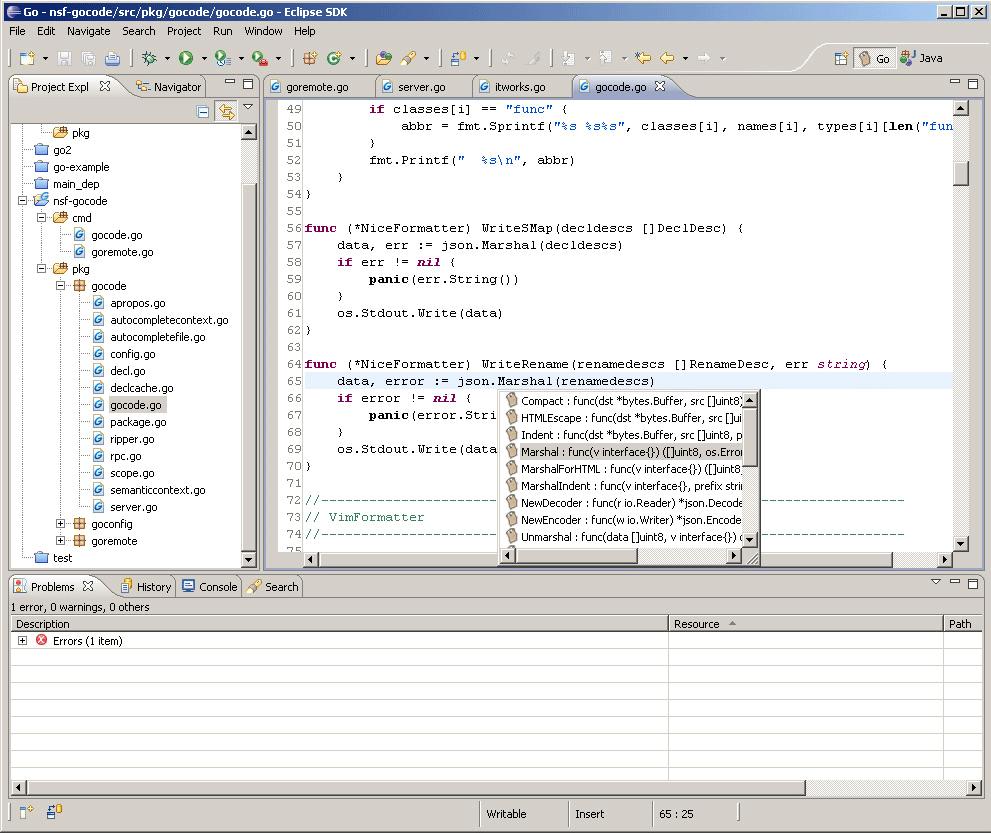
Eclipse is also a great development tool, I'll show you how to use it to write Go programs.
|
|
|
|
|
|
|
|
Figure 1.1 Eclipse main panel of Go editor
|
|
|
|
1. Download and install [Eclipse](http://www.eclipse.org/)
|
|
2. Download [goclipse](https://code.google.com/p/goclipse/)
|
|
[http://code.google.com/p/goclipse/wiki/InstallationInstructions](http://code.google.com/p/goclipse/wiki/InstallationInstructions)
|
|
3. Download gocode
|
|
|
|
gocode in Github.
|
|
|
|
https://github.com/nsf/gocode
|
|
|
|
You need to install git in Windows, usually we use [msysgit](https://code.google.com/p/msysgit/)
|
|
|
|
Install gocode in the command tool
|
|
|
|
go get -u github.com/nsf/gocode
|
|
|
|
You can install from source code if you like.
|
|
4. Download and install [MinGW](http://sourceforge.net/projects/mingw/files/MinGW/)
|
|
5. Configure plugins.
|
|
|
|
Windows->Preferences->Go
|
|
|
|
(1).Configure Go compiler
|
|
|
|

|
|
|
|
Figure 1.12 Go Setting in Eclipse
|
|
|
|
(2).Configure gocode(optional), set gocode path to where the gocode.exe is.
|
|
|
|

|
|
|
|
Figure 1.13 gocode Setting
|
|
|
|
(3).Configure gdb(optional), set gdb path to where the gdb.exe is.
|
|
|
|

|
|
|
|
Figure 1.14 gdb Setting
|
|
6. Check installation
|
|
|
|
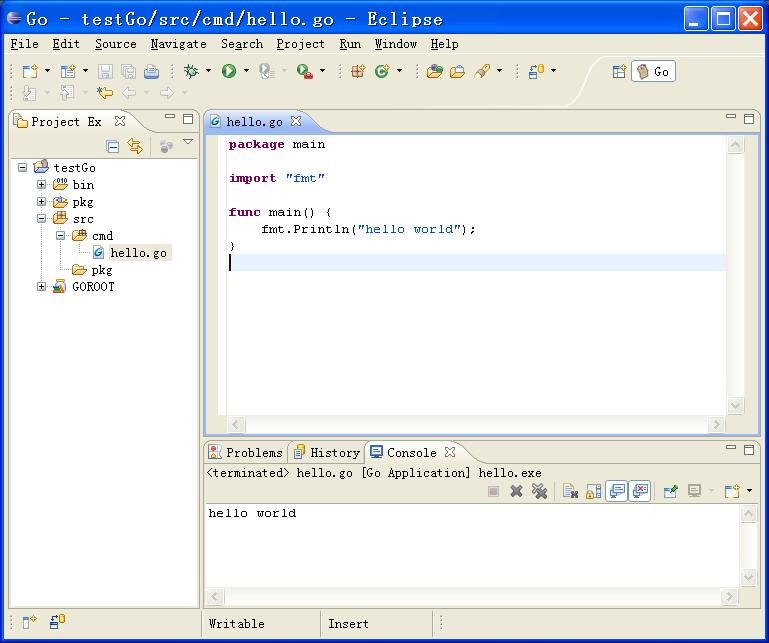
Create a new Go project and hello.go file as following.
|
|
|
|
|
|
|
|
Figure 1.15 Create new project and file
|
|
|
|
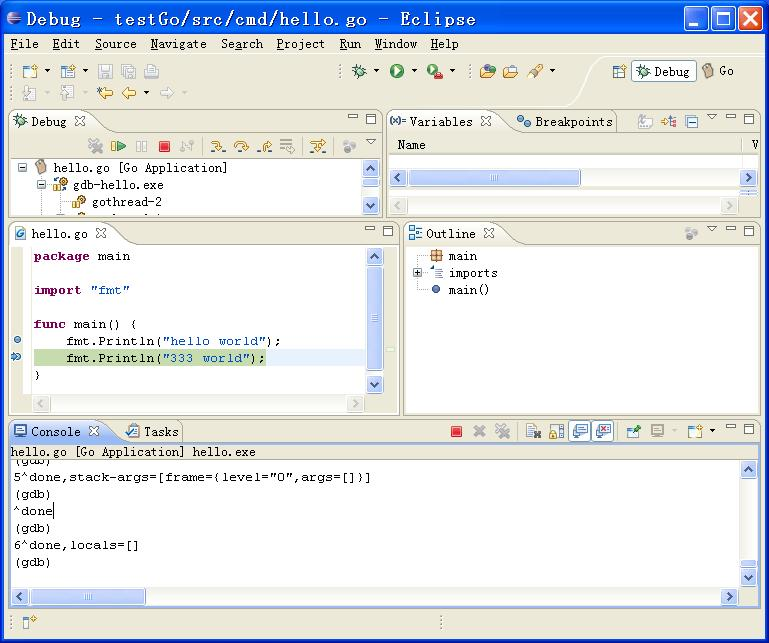
Test installation as follows.(you need to type command in console in Eclipse)
|
|
|
|
|
|
|
|
Figure 1.16 Test Go program in Eclipse
|
|
|
|
## IntelliJ IDEA
|
|
|
|
People who are working with Java should be familiar with this IDE, it supports Go syntax highlight, intelligent completion and reconstructed by a plugin.
|
|
|
|
1. Download IDEA, there is no different from Ultimate and Community Edition
|
|
|
|

|
|
|
|
2. Install Go plugin. Choose `File - Setting - Plugins`, then click `Browser repo`.
|
|
|
|

|
|
|
|
3. Search `golang`, double click `download and install`, wait for downloading.
|
|
|
|

|
|
|
|
Click `Apply`, then restart.
|
|
4. Now you can create Go project.
|
|
|
|

|
|
|
|
Input position of go sdk in the next step, basically it's your $GOROOT.
|
|
|
|
( ***See a [blog post](http://wuwen.org/tips-about-using-intellij-idea-and-go/) for setup and use IntelliJ IDEA with Go step by step *** )
|
|
|
|
## Links
|
|
|
|
- [Directory](preface.md)
|
|
- Previous section: [Go commands](01.3.md)
|
|
- Next section: [Summary](01.5.md)
|