
ncspot

ncurses Spotify client written in Rust using librespot. It is heavily inspired by ncurses MPD clients, such as ncmpc. My motivation was to provide a simple and resource friendly alternative to the official client as well as to support platforms that currently don't have a Spotify client, such as the *BSDs.
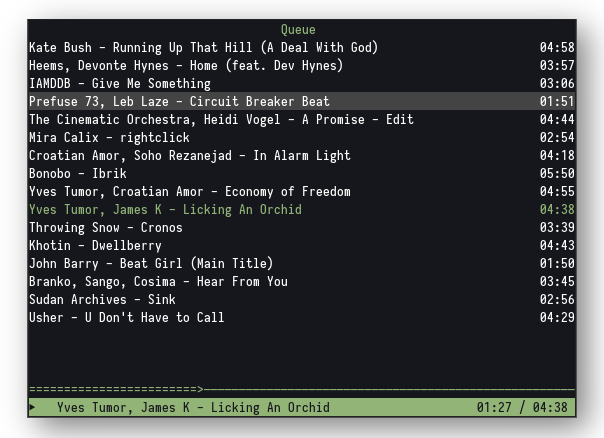
NOTE: ncspot is still in a very early development stage. Things will break and change. The feature set is still very limited. Also, as this is my first contact with Rust, some design decisions may need to be reworked in the future. Contributions welcome, but please be kind ;)
Requirements
- Rust
libasound2-dev(orportaudio-dev, if you want to use the PortAudio backend)libncurses-devandlibssl-devlibdbus-1-dev- A Spotify premium account
- pkg-config
Usage
- Set your login credentials (see configuration)
- Build using
cargo build --release - The initial screen is the debug log. Press
F1for the queue andF2to search for a track. More key bindings are described below. - For debugging, pass a debug log filename, e.g.
ncspot -d debug.log
Key Bindings
These keybindings are hardcoded for now. In the future it may be desirable to have them configurable.
- Navigate through the screens using the F-keys:
F1: Queuecclears the entire queueddeletes the currently selected tracksopens a dialog to save the queue to a playlist
F2: SearchF3: Playlists
- Tracks and playlists can be played using
Returnand queued usingSpace Shift-ptoggles playback of a trackShift-sstops a trackShift-rupdates the playlist cache<and>play the previous or next track, respectivelyqquits ncspot
You can also open a Vim style commandprompt using :, the following commands
are supported:
quit: Quit ncspottoggle: Toggle playbackstop: Stop playbackprevious/next: Play previous/next trackclear: Clear playlist
The screens can be opened with queue, search, playlists and log, whereas
search can be supplied with a search term that will be entered after opening
the search view.
Configuration
For now, a configuration file containing Spotify login data needs to be created manually, until a login-screen is implemented (https://github.com/hrkfdn/ncspot/issues/1).
The file needs to look like this:
username = "spotify_user"
password = "spotify_password"
Please save it to ~/.config/ncspot.
Theming
The color palette can be modified in the configuration. For instance, to have ncspot match Spotify's official client, you can add the following entries to the configuration file:
[theme]
background = "black"
primary = "light white"
secondary = "light black"
title = "green"
playing = "green"
playing_bg = "black"
highlight = "light white"
highlight_bg = "#484848"
error = "light white"
error_bg = "red"
statusbar = "black"
statusbar_progress = "green"
statusbar_bg = "green"
cmdline = "light white"
cmdline_bg = "black"
More examples can be found in pull request https://github.com/hrkfdn/ncspot/pull/40.
Audio backends
By default ncspot is built using the Rudio backend. To make it use the
PortAudio backend (e.g. *BSD), you need to recompile ncspot with the
portaudio_backend feature:
cargo run --no-default-features --features portaudio_backend